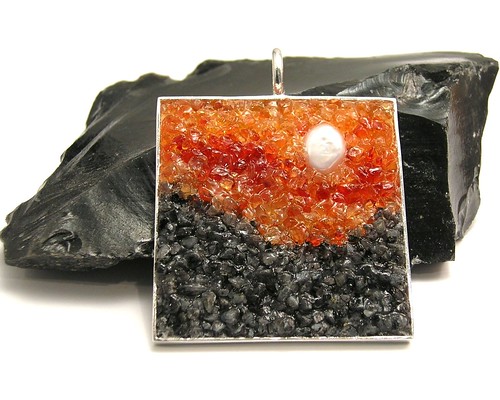
Submit your photos for consideration as a Weekly Inspiration by adding them to the Flickr Group.
Friday, August 5, 2011


Wednesday, August 3, 2011
SEO and Your Customers

This concept is called "conversions", you want the highest conversion rate you can get (for a web store that the % of visitors who make a purchase). If you have 5000 visitors a month with a conversion rate of 1% you are doing the same amount of business as a shop with 1000 visitors but a 5% conversion rate (50 sales per month). If you have 10,000 visitors a month but no one buys anything you might as well have had no visitors at all.
Here are three fictional titles for the same fictional product:
"Marvin the Robot"
"Soap robot lavender scented blue soy moisturizing handmade vegan"
"Marvin the Robot soap, moisturizing lavender scented soy soap"
The first is terrible, it doesn't even tell you what the item is. You can have creative names for your product, a memorable name may stick in a visitors head better than something descriptive but generic. However if the not having many clues, or misleading clues, about what the item is will hurt you as well. If visitors are clicking on "Marvin the Robot" expecting a toy or artwork not soap then that's not going to help your sales.
The second is better but a visitor is going to see it as either boring at best and spammy at worst. Why? because it's just a list of attributes of the product. People react to language in certain ways and if words don't read like a meaningful statement people aren't going to perceive it as valuable. Try reading your titles out loud and see how they sound.
The third title strikes the right balance. It both is descriptive, telling you a lot about the product (that it is a robot shaped soap, made of soy, moisturizes the skin, and is lavender scented) while also giving you product personality. If you don't know about the importance of telling a story about your business please go read All Marketers are Liars by Seth Godin he describes the concept far better than I can but the gist of it is that people respond far more to being told a good authentic story than they do just being given the bare facts.
I used titles in this example because Etsy's new CEO just released an update on improvements to relevancy search and how to make titles better for search. I applaud the Etsy team for making much needed improvements to the search engine but I think it gave people the wrong idea. Ranking higher in search will not do any good if your customers aren't enticed by what they see.
Monday, August 1, 2011
Keep an Open Mind
I'm currently working on a wholesale jewelry order however it's not one of my standard designs. Not even close in fact. My usually jewelry designs are sea creatures not food however I was contacted about doing a large number of vegetable earrings. One of my twitter friends who also makes jewelry (but not in polymer clay) wanted some pieces to sell at a local festival that was geared towards it's theme. We worked out a price per piece and I've been busy creating them. If I was to keep rigidly to my usual jewelry themes I would have missed this chance for a pretty good order. I don't plan to expand my own lines to food or anything of that nature but for a custom wholesale order? Absolutely.
Friday, July 29, 2011
Weekly Inspiration
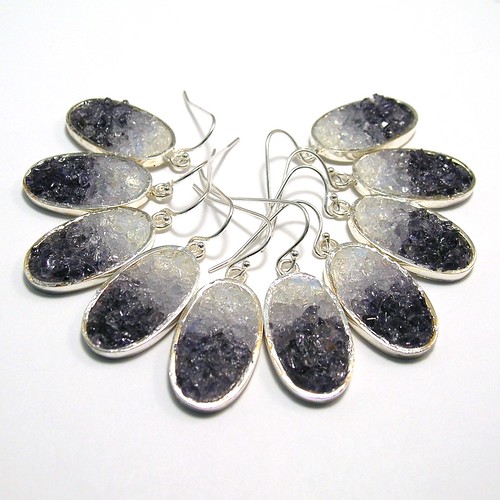
Submit your photos for consideration as a Weekly Inspiration by adding them to the Flickr Group.
Thursday, July 28, 2011
New Twitter Account
I'm giving the Handmade Business Blog it's own twitter account. If you follow my personal twitter account @Noadi I will still announce there new posts but I'll now be posting not just new blog posts but also business how to related stuff on the new account @HandmadeBizBlog. I hope that this does two things A: gives people more access to me about business related topics and B: keeps my personal account more focused on my personal stuff (creating jewelry, talking about skepticism, etc). Also I've given the blog a dedicated email address and am updating the links on the site to reflect that change too.
Thursday, July 21, 2011
Great SEO Guide You Need to Read

I also highly recommend subscribing to their blog as well it's always full of interesting tips and insights into what's up and coming on the web.
Wednesday, July 20, 2011
Quarterly Sprucing Up
I've written before about how important it is to keep reevaluating what you are doing and keeping your business fresh. I like to go through my shop every 3 months and make sure everything it as good as it can be and see if anything needs changing. I generally do this at the end of March, June, September, and December (after the holiday rush). Well I got a little behind so I'm just now working on freshening up my Etsy shop.
Here's what I did:
So what could you do right now to freshen up your online presence?
Here's what I did:
- Made sure all listings had up to date information and tags.
- Moved the short little stories for my cephalopod jewelry to after the main description instead of before.
- Added new custom order listings.
- Changed some categories. I completely got rid of the "Clearance" section, changed "Gifts and More" to "Seasonal Gifts" and added an "Everything Else" category (right now it just has my decorated tins which were moved out of "Gifts and More" but will have other stuff soon).
So what could you do right now to freshen up your online presence?
Thursday, July 14, 2011
Link Roundup - Getting Technical
It's been a while since I've done a Link Roundup but I thought this was a good time to do one with the launch of Google+ (yes, I'm on) and many sites on Google and elsewhere launching major redesigns. In fact Blogger which hosts this blog and is owned by Google has a fantastic new look if you use the Blogger in Draft feature that lets you try new features before they roll out to everyone.
So this roundup is recent news and articles focusing on web technology and how it relates to or can be used by small business.
The Tech Stuff
Google Plus Doesn't Need to 'Kill' Anything to Be a Winner from AllBusiness
Google+ Statistics Report from FindPeopleOnline
Top Gmail Apps and Plug-ins for Running a Business from Small Business Trends
Find & Make Your Own Infographics With Visual.ly from Mashable
Some Great Non-Tech Stuff
5 Ways That Content Marketing Has Changed The Art Of Selling Forever from Duct Tape Marketing
Free Class – Copywriting 101 from Indie Biz Chicks
Business Thank You Letters – Your Secret Marketing Weapon from Craft Marketing Tutor
So this roundup is recent news and articles focusing on web technology and how it relates to or can be used by small business.
The Tech Stuff
Google Plus Doesn't Need to 'Kill' Anything to Be a Winner from AllBusiness
Google+ Statistics Report from FindPeopleOnline
Top Gmail Apps and Plug-ins for Running a Business from Small Business Trends
Find & Make Your Own Infographics With Visual.ly from Mashable
Some Great Non-Tech Stuff
5 Ways That Content Marketing Has Changed The Art Of Selling Forever from Duct Tape Marketing
Free Class – Copywriting 101 from Indie Biz Chicks
Business Thank You Letters – Your Secret Marketing Weapon from Craft Marketing Tutor
Tuesday, July 5, 2011
Getting more traffic from YouTube
I'm a big fan of using video to promote your business. We humans are very visual animals, this is one reason good photos are so important when you're selling handmade products. When the photos are also moving that grabs our attention even more.
Now one of the problems with using YouTube for promotion is that usually the only place you can put a link is in your description and many users ignore the description, even more so since YouTube redesigned the video pages to hide most of the description. There is a way around this, using YouTube's Promoted Videos you can put what YouTube calls a "call to action overlay" on your video that can contain a link to your shop. This will cost a little bit of money, because it is an advertising program, but there are ways to minimize how much you spend.
Here's a video that describes how to set up a Promoted Video and use the call to action overlay. YouTube gives you very few characters to write your message so choose your words carefully and be creative.
Here's an example of one of my videos using this overlay (apparently it doesn't work on embedded videos so you'll need to go click the link to the video on youtube to see it in action). If you have ad blocking software you might need to disable it to see the overlay.
 Tip: YouTube also gives you the option to use a 56x56pixel image. I used a .png of the cuttlefish in my logo with a transparent background. Just take any image you want, crop it square, then scale it down to 56x56, save, and upload to an image hosting site like Photobucket. You can then use it on your overlay to add just a tiny bit more branding. I recommend using your logo or a portion of it like I did.
Now one of the problems with using YouTube for promotion is that usually the only place you can put a link is in your description and many users ignore the description, even more so since YouTube redesigned the video pages to hide most of the description. There is a way around this, using YouTube's Promoted Videos you can put what YouTube calls a "call to action overlay" on your video that can contain a link to your shop. This will cost a little bit of money, because it is an advertising program, but there are ways to minimize how much you spend.
Here's a video that describes how to set up a Promoted Video and use the call to action overlay. YouTube gives you very few characters to write your message so choose your words carefully and be creative.
Here's an example of one of my videos using this overlay (apparently it doesn't work on embedded videos so you'll need to go click the link to the video on youtube to see it in action). If you have ad blocking software you might need to disable it to see the overlay.
Monday, July 4, 2011
New Resources Page
Happy 4th of July to all my US readers! Not much of a post today just a quick announcement. I've started a resources page that has links to business supplies, books, and websites that I recommend.
Subscribe to:
Posts (Atom)
